Canva free vs Pro is the question every Canva user eventually faces. You are designing away on the free plan, everything is going well, and then suddenly you hit a wall — a template you cannot use, a background you cannot remove, a file you cannot export the way you need. And you start wondering whether it is finally time to pay. Having tested both plans thoroughly and seen what genuinely matters for different types of users this is the honest breakdown so you can stop second guessing and make the right call for your specific situation.
Start Here — Do Not Upgrade Straight Away
Before comparing Canva free vs Pro the most important thing to know is this — do not upgrade from day one unless you genuinely want to. When you first create your Canva account it will immediately prompt you to upgrade. Press skip.
Start with the free plan. Use it. Get comfortable with how the platform works. Your actual frustrations will tell you far more accurately than any comparison article whether Pro is worth paying for. Many people use Canva free for months or years without ever needing to upgrade. Others hit the limitations within their first week. The difference is not the plan — it is what you are using Canva for.
Already know what the free plan includes? Read our full breakdown in Is Canva Free? Yes, If You Do This
What Canva Free Actually Gives You
Canva free is genuinely capable and far more powerful than most people realise before they start using it. You get access to over 1,000 design types covering social media posts, presentations, documents, videos, print materials and significantly more. The library includes over 1 million professionally designed templates and more than 3 million stock photos and graphics alongside 5GB of cloud storage and collaboration features for inviting others to view and edit your designs.
You can create and sell things you make on the free plan. Ebooks, graphics for merchandise, digital products — all of this is permitted on a free Canva account and people have been doing it successfully since Canva launched. The most important rule is that you create unique designs by combining elements rather than reselling existing templates or standalone elements as they are.
There are also free features most people never discover. Automatic captions with karaoke style animations are available completely free. There is a mini recording studio hidden inside the uploads section for recording voiceovers, course lessons and presentations. You can present live with speaker notes your audience cannot see. And the apps marketplace gives you access to over 600 apps many of which are completely free.
Where the free plan starts to hurt:
The most noticeable limitation is the content library. As you browse you constantly encounter templates and graphics marked with a crown icon showing they are only available on paid plans. There is no way to filter these out as a free user which means more scrolling to find usable assets — a genuine daily frustration.
You cannot download images with a transparent background on the free plan which becomes a real problem when creating logos or icons that need to sit cleanly on different coloured backgrounds. You are limited to one brand kit with restricted colour options. And access to Canva’s Magic Studio AI features is limited enough that you can test them but not use them regularly for meaningful work.
What Canva Pro Actually Changes
Canva Pro costs $120 per year. The honest way to evaluate whether it is worth it is not to compare feature lists but to ask yourself one direct question — am I spending significant time trying to find workarounds to things the free plan does not support?
If you regularly hunt for free versions of premium graphics, manually recreate designs at different sizes for different platforms, work around the background remover limitation, or struggle with file export formats — that time has a real cost. Businesses spend money to make money and if your time is worth anything at all the hours saved by Pro features can make the subscription pay for itself within days.
The Canva Pro features that make the real difference:
The complete content library gives you unlimited access to premium templates and over 100 million premium stock photos, videos, audio tracks and graphics. You never need to hunt for free asset versions or settle for second best options again. Every graphic, every template, every element is simply available to you without checking or worrying.
The background remover removes entire image backgrounds with a single click. If you create product images, design social media graphics, or work with any photography regularly this single feature alone saves hours every month and produces significantly more professional results.
Magic Switch lets you resize and even translate designs instantly. Create an Instagram post and automatically generate correctly sized versions for Facebook, YouTube thumbnails, Instagram stories, and presentation slides at a single click without rebuilding anything from scratch. For anyone creating content across multiple platforms this feature changes how quickly you can work completely.
The brand kit expands from the single restricted free version to up to 1,000 brand kits where you store logos, brand colours, custom fonts and brand photos all available at a single click inside any design. If you manage even one brand consistently this eliminates the daily frustration of hunting for hex codes and logo files every time you start a new design.
Storage increases from 5GB to 1TB of cloud storage. For anyone working with high resolution images and video files the free plan’s 5GB fills up surprisingly quickly and the upgrade removes that concern entirely.
You get expanded access to over 20 AI tools in the Magic Studio suite. Magic Grab pulls subjects from images and automatically fills the background — genuinely useful for thumbnails, carousels and social media content. Magic Expand extends backgrounds from horizontal images or creates more space in a design. These are time saving features that change how fast you can produce professional looking content once you start using them regularly.
Version history lets you restore any previous version of a design instantly. For anyone who edits designs regularly or shares them with clients for feedback this is a safety net that prevents painful mistakes from becoming permanent.
Saving files as SVG is only available on Canva Pro. SVG is a vector file format — the same professional format that hired designers deliver logos in. If you are creating any brand identity work inside Canva the ability to save and export SVG files is essential for producing logos that can be resized to any size without losing quality.
Finally Canva Pro includes a content planner for scheduling social media posts directly from Canva and online customer support — neither of which are available on the free plan.
Canva Free vs Pro — The Honest Side by Side
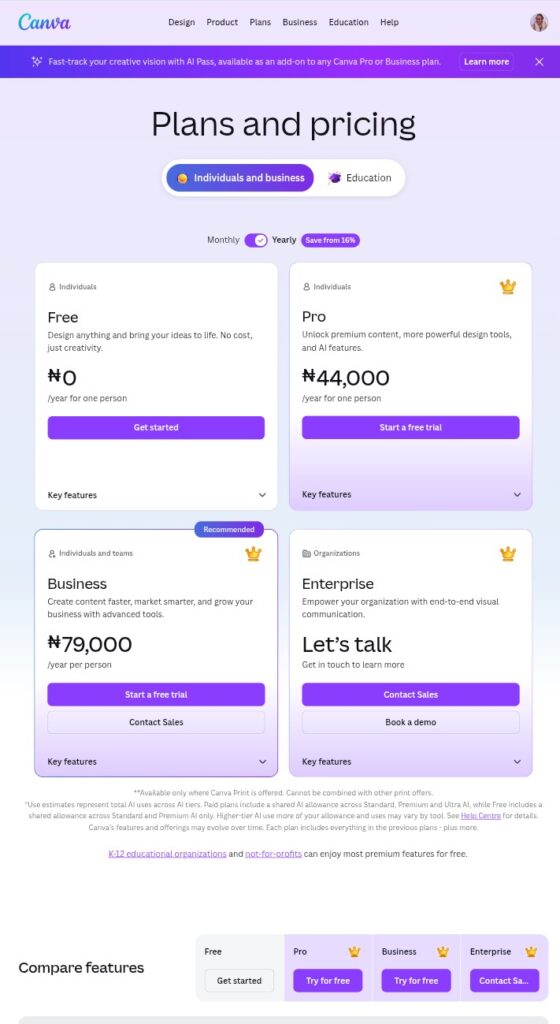
Here is what the comparison actually looks like in real use:
Content library — Free gives you 3 million assets with crown icons you cannot use scattered throughout. Pro gives you 100 million assets with no restrictions and no crown icons to navigate around.
Background removal — Free does not include it. Pro removes backgrounds with a single click.
Resizing for different platforms — Free requires you to rebuild designs manually for each platform. Pro resizes everything automatically with Magic Switch.
Brand management — Free gives you one limited brand kit. Pro gives you up to 1,000 fully featured brand kits.
Cloud storage — Free gives you 5GB. Pro gives you 1TB.
AI tools — Free gives you limited testing access. Pro gives you full access to over 20 Magic Studio AI tools.
File export — Free exports standard formats without transparency. Pro exports SVG, transparent PNG, and all professional formats.
Version history — Free does not include it. Pro lets you restore any previous design version instantly.
Customer support — Free has no dedicated support. Pro includes online customer support.
Price — Free costs nothing. Pro costs $120 per year.
How to Decide Which One You Actually Need
Think through your situation honestly rather than defaulting to either keeping the free plan because you dislike spending money or upgrading because Pro sounds impressive.
Stay on Canva free if you create designs occasionally, you are just starting out and still learning the platform, you are a student or hobbyist, you are getting by without noticing the limitations, and the workarounds are not actually costing you meaningful time.
Upgrade to Canva Pro if you are a solopreneur, freelancer, content creator or business owner creating designs regularly. You need the background remover, transparent exports, brand consistency tools or access to the full asset library. You find yourself spending time on workarounds that could be spent on actual work. And importantly — if your hourly rate is anything reasonable, a subscription that costs roughly $10 per month only needs to save you a few minutes per hour before it becomes financially worthwhile compared to the time it replaces.
And before you commit to paying — use the 30 day free trial for Canva Pro. You get complete access to every single Pro feature for 30 days at no cost. Canva will notify you before the trial ends so you are not caught off guard. That trial period is more than enough time to know definitively whether the upgrade makes sense for how you actually work.
The Bottom Line
Canva free vs Pro is not a question with one right answer for everyone. The free plan is genuinely capable and millions of creators run successful businesses on it without ever upgrading.
But if you regularly find yourself spending time on workarounds, settling for lower quality assets, struggling with file exports, or manually recreating designs for different platforms — those friction points have a real cost. At $120 per year compared to design software like Adobe or the cost of hiring a professional designer even occasionally, Canva Pro delivers extraordinary value for the time it saves.
Try the free plan first. Let your frustrations tell you when the time is right. And when it is the 30 day trial means you never have to pay before you are certain.
Are you a writer or creator building your platform? Publish your stories, articles and ideas completely free at inkwrit.com — a platform built for creators just like you.
For writers looking for free tools beyond Canva read our Ultimate Guide to Free Writing Software

Author: Bridget Austin
Ifeoma, who writes under the pen name Bridget Austin, is the founder of Inkwrit — a freelance writing platform built for African writers and storytellers. With a background in copywriting and content strategy, she created Inkwrit to give African voices a professional home to publish, build portfolios, and grow their writing careers. When she's not building the Inkwrit community, she writes about freelance writing, African literature, and the business of creative work.