QuillBot is known for its paraphrasing tool, but did you know it also has an AI content detector? In my early days as a blogger, I came to learn about QuillBot through a friend who kept telling me how QuillBot was the best paraphrasing app out there. When I began using it, I discovered he was right—it truly delivered. Later on, I discovered that QuillBot also has an AI checker which helps you verify if your work or someone else’s work was written with AI. This software, like any other tool, is powerful and can aid your writing. However, you need to understand some fundamental things I discovered that can help you make informed decisions. So let’s dive in.
Check out this post on: Best Free Writing Software: Your Ultimate Guide to Choosing Right
What You’ll Learn (Quillbot ai checker )
- How QuillBot’s AI checker actually works from real usage
- The accuracy and limitations I’ve discovered through testing
- Other powerful features QuillBot offers writers
- Whether the free or paid version is worth your investment
- My honest assessment after extensive use in 2025
Understanding QuillBot and Its Position in the Market (Quillbot ai checker )
QuillBot has established itself as one of the most accessed AI tools globally, and for good reason. According to a 2025 Cloudflare report on AI tool traffic, QuillBot ranked 8th among the most accessed AI platforms worldwide, positioned right behind giants like ChatGPT, Claude, Perplexity, and Gemini. This isn’t just another AI tool trying to find its place—it’s a platform that millions of users trust for their writing needs.
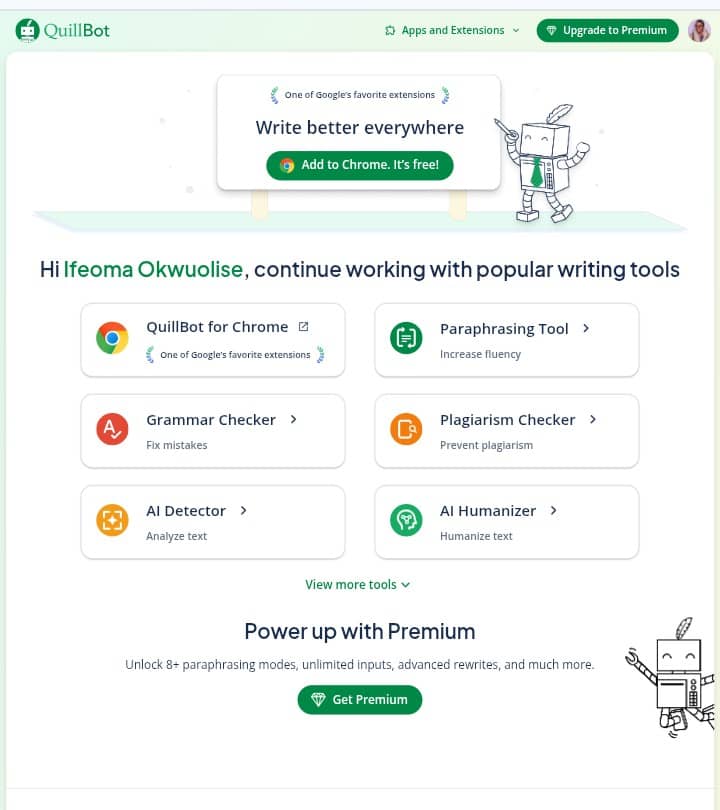
At its core, QuillBot is an AI-powered paraphrasing tool, but it’s evolved into much more than that. The platform now offers comprehensive writing assistance including grammar checking, text summarization, citation generation, plagiarism detection, and the AI content detector I want to focus on today. What makes QuillBot particularly appealing is its accessibility—you can use it directly in your browser or install the Chrome extension for seamless integration into your workflow.
I’ve been using QuillBot for a while now because it strikes a balance between functionality and user-friendliness. The interface is intuitive, and you don’t need prior experience with AI tools to get value from it immediately.
How the AI Checker Actually Works (Quillbot ai checker )
Before you start using QuillBot’s AI detector, you need to understand something critical: no AI detector on the market is 100% reliable. Not QuillBot’s, not any other platform’s. This is important because I see too many people treating AI detection results as absolute truth when they’re actually probability assessments.
Here’s how the QuillBot AI checker functions. When you paste text into the detector, it analyzes patterns in the writing—sentence structure, word choice, stylistic consistency, and other linguistic markers. Based on these patterns, it calculates a probability score indicating the likelihood that AI generated the content.
Let me give you a real example from my testing. I pasted a piece of content that was partially AI-generated with some manual edits I’d made. QuillBot’s detector returned a 59% probability that the text was AI-generated. That result was actually quite accurate—the content was indeed a mix of AI generation and human editing. But here’s what you need to understand: that percentage represents probability, not certainty.
If you paste your writing into QuillBot and it shows 80% AI probability, that doesn’t definitively prove AI wrote it. It means the text exhibits patterns commonly associated with AI-generated content. Human writers can sometimes produce text that looks “AI-like” to these detectors, and AI can be prompted to write in ways that appear more human. The technology is sophisticated, but it’s working with pattern recognition and statistical analysis, not foolproof detection.
The Accuracy Problem: Let’s Be Honest (Quillbot ai checker )
I’m going to be straight with you about AI detection accuracy because I think honesty serves writers better than hype. The technology still has significant limitations in 2025. In my experience testing various AI detectors, including QuillBot’s, none of them achieve truly reliable accuracy across all types of content.
The fundamental challenge is that AI detection relies on identifying patterns, and both AI models and human writers are constantly evolving. AI tools are getting better at producing natural-sounding text, and humans sometimes write in ways that trigger false positives on these detectors. It’s a moving target.
The most reliable AI content detector? Still the human brain. I know that’s not the answer people want to hear, but it’s the reality we’re working with right now. These tools can provide useful signals and flag content for closer review, but they shouldn’t be your sole method for determining whether something was AI-generated.
That said, I don’t think this limitation makes AI checkers worthless. They serve a purpose as part of a larger content evaluation strategy. Just don’t rely on them as your only source of truth.
My Philosophy on Using AI in Writing (Quillbot ai checker )
Since we’re talking about AI detection, I want to share my perspective on AI-generated content because it shapes how I use tools like QuillBot. I have no problem with writers using AI to generate content. What I take issue with is writers who generate content with AI, don’t read it critically, and immediately post it to social media, submit it for work, or publish it without evaluating what was actually written.
The approach I recommend—and what I practice myself—is this: Write your initial draft with your own thoughts and arguments. Then use AI to review your work, suggest improvements, or offer perspectives you might have missed. Read everything carefully, make your own decisions, and take full responsibility for the final content you publish.
AI should function as a tool in your workflow, not as a replacement for your thinking. You’re the writer. AI is your assistant. That relationship matters, and it’s one reason why tools like QuillBot’s AI checker exist—to help you verify and refine your process, not to serve as judge and jury over your work.
Want to share your software review?
Join inkwrit
Beyond AI Detection: Other Features That Actually Help (Quillbot ai checker )
While the AI checker gets attention, QuillBot offers several other features I use regularly that deserve mention:
Paraphraser: This is QuillBot’s flagship feature and it’s excellent. Paste your text and it suggests rephrased versions while preserving your meaning. You can choose different modes—fluency, formal, academic, and others. Some advanced modes require the paid version, but even the free paraphraser is quite capable. The tool highlights suggested changes in different colors, and you can accept or reject each one individually.
Grammar Checker: This goes beyond basic spell-check. QuillBot’s grammar checker analyzes complex sentence structures and explains why it’s suggesting corrections. It works in real-time, so you can fix issues as you write rather than editing everything later. If you send a lot of professional emails or write formal correspondence, this feature alone can justify using QuillBot.
Summarizer: This has become one of my favorite features. QuillBot extracts key points from longer content, whether you’re reading academic papers, research articles, or web content. You can control the summary length and choose between bullet-point or paragraph format. For anyone who reads extensively for research, this is a genuine time-saver.
Citation Generator: QuillBot supports multiple citation styles including APA, MLA, and Chicago. You input your source information and it formats the citation correctly. Simple, but incredibly useful for academic or professional writing.
Plagiarism Checker: This feature is only available in the paid version. It checks your text against internet sources to identify potential plagiarism. If you’re a professor checking student work or a professional writer ensuring originality, this adds significant value.
AI Humanizer: You can paste AI-generated text and QuillBot reformulates it to sound more natural. Now, you could prompt ChatGPT or Claude to do this, but QuillBot specializes in it. The tool has been refined based on feedback from thousands of users, so it tends to produce better results than trying to craft the perfect humanization prompt yourself.
One limitation worth noting: QuillBot supports paraphrasing in over 20 languages, but advanced modes like “fluency” only work with English text.
Free vs. Paid: What You’re Actually Getting (Quillbot ai checker )
QuillBot offers both free and paid tiers, and the question of whether to upgrade depends on how you use the tool. The free version gives you access to core functionality but imposes limitations—word count caps on paraphrasing, restricted mode options, and limited AI detector usage.
I suggest starting with the free version to test whether QuillBot fits your workflow. If you find yourself hitting the limitations regularly and the tool genuinely improves your writing process, then consider the paid version.
The paid tier is worth it if you fall into certain categories: lawyers who validate documents frequently, professors checking student submissions, professional writers producing high volumes of content, or anyone who writes extensively for their work. The paid version removes most restrictions or increases them substantially, with some features becoming unlimited.
QuillBot also offers a three-day money-back guarantee on the premium version, so you have a safety net if you try it and decide it’s not right for you.
Here’s my take on the “but ChatGPT can do this” argument I hear sometimes: Yes, general AI tools can perform many of these functions. But QuillBot is a specialized tool that’s been continuously refined for text improvement. It incorporates best practices developed from millions of user interactions. Getting equivalent results from ChatGPT would require you to craft excellent prompts for each task, and even then, the consistency might not match a purpose-built tool.
My Final Assessment (Quillbot ai checker )
After extensive use of QuillBot, here’s where I land. The AI checker is useful but imperfect. It provides probability indicators that can flag content for closer human review, but it’s not reliable enough to serve as your sole detection method. Understand its limitations and use it as one signal among many, not as definitive proof.
Where QuillBot really shines is as a comprehensive writing assistant. The paraphraser, grammar checker, and summarizer are legitimately helpful tools that I use regularly. The platform has earned its spot as one of the world’s most accessed AI tools because it delivers practical value for writers.
If you write frequently—whether for work, school, or personal projects—QuillBot is worth exploring. Start with the free version to see if it fits your workflow. If you find yourself relying on it consistently, the paid version might be a worthwhile investment depending on your needs.
The key is approaching these tools with realistic expectations. QuillBot won’t magically solve all your writing challenges, but it can make your workflow more efficient and help you produce cleaner, more polished content. That’s valuable, even if the AI detection component isn’t perfect.
Want to share your own writing tool reviews? Join Inkwrit and connect with fellow writers.

Author: Bridget Austin
Ifeoma, who writes under the pen name Bridget Austin, is the founder of Inkwrit — a freelance writing platform built for African writers and storytellers. With a background in copywriting and content strategy, she created Inkwrit to give African voices a professional home to publish, build portfolios, and grow their writing careers. When she's not building the Inkwrit community, she writes about freelance writing, African literature, and the business of creative work.