Finding the best free music and score writing software for composers can feel overwhelming when you’re staring at dozens of options. Whether you’re a composer creating your first piano piece or arranging complex orchestral scores, the music notation software you choose will either fuel your creativity or frustrate you at every turn.
The landscape of free score writing software and music composition tools has evolved dramatically. Today’s composers can access powerful music notation programs without spending a cent, but the question remains: which free music writing software actually delivers professional results?
To answer this, I analyzed expert reviews from professional music educators, including a comprehensive software comparison from The Musical Notes YouTube channel, an official tutorial from MuseScore’s channel, and a detailed hands-on guide from pianoTV (hosted by Alicia). Here’s the definitive guide to the best free music and score writing software for composers in 2026.
If you love to delve into the writing world check out this article on: Best Free Writing Software: Your Ultimate Guide to Choosing Right
KEY TAKEAWAYS:
- MuseScore is the best free music and score writing software for composers – completely free with professional features
- Free music notation software can match paid options for 90% of composition needs
- Professional score writing software (Finale, Sibelius, Dorico) costs $99-$600 but offers advanced workflow features
- All major music composition software offers free trials so composers can test before buying
- The best free music writing software gets regular updates – MuseScore proves free doesn’t mean abandoned
Understanding Music Notation Software vs Score Writing Software for Composers
Before exploring the best free music and score writing software, let’s clarify the terminology. Music notation software, score writing software, and music composition software essentially refer to the same category of tools – digital programs that let composers create sheet music, arrange compositions, and share their work in various formats.
Whether you’re writing a simple melody or a full symphonic arrangement, these programs handle everything from note entry to final printing. The terms “music notation software” and “score writing software” are often used interchangeably by composers, though some prefer “score writing” when focusing on orchestral or multi-staff arrangements.
Best Free Music Score Writing Software: MuseScore
When searching for the best free music and score writing software for composers, MuseScore consistently rises to the top. This isn’t just another limited “freemium” app – it’s genuinely professional-grade music notation software that costs nothing.
What Makes MuseScore the Best Free Music Writing Software for Composers
MuseScore operates as a free, open-source program developed by a community of passionate musicians and programmers. Unlike commercial software with aggressive advertising or limited free tiers, MuseScore gives you full functionality without spending a cent.
The program works best on desktop computers (Windows, Mac, or Linux), where you get complete access to all composition and editing features. While mobile apps exist, they’re primarily designed for playback rather than serious composition work. If you want to actually create and manipulate music, stick with the desktop version.
One clarification that confuses many newcomers: MuseScore offers both free and paid versions. The free software on your computer is completely functional – you’re not missing critical features. The paid subscription primarily unlocks publishing options on their website and some additional cloud features. After using the free version for years, most composers find they never need the premium tier.
Core Features of This Free Music Composition Software
The note input system in MuseScore offers flexibility that accommodates different composer workflows. You can click notes into place with your mouse, type letter names directly (A, B, C, D, etc.), or connect a MIDI keyboard for real-time input. The number keys on your keyboard serve as shortcuts for note durations – a simple system that speeds up music composition once you learn it.
One of MuseScore’s most practical features for learning musicians is its tempo control. You can slow down any piece to a comfortable practice speed, then gradually increase the tempo as you improve. During playback, a blue tracking bar scrolls across the notation, helping you follow along. It’s essentially a highly sophisticated metronome that displays exactly what notes to play.
The interface revolves around two main panels. The Palettes panel contains every musical element you might need – dynamics, articulations, tempo markings, key signatures, and more. You simply select an element and click where you want it placed on your score. The Properties panel (called the Inspector in older versions) lets you fine-tune any element you’ve selected, from note head shapes to beaming patterns.
Who Should Use MuseScore ( Best Free Music & Score Writing Software for Composers )
According to expert analysis from The Musical Notes channel, MuseScore serves the needs of student musicians, amateur composers, and a significant portion of working professionals. If you’re not regularly writing extremely complex contemporary notation or working on major film scores, MuseScore likely has everything you need.
Advantages:
- Zero financial barrier to entry
- Clean interface that doesn’t overwhelm beginners
- Regular updates that add features and fix bugs
- Active community forums for troubleshooting
- No subscription required
Limitations:
- Mobile apps offer limited functionality compared to desktop
- Some advanced notation techniques require workarounds
- MIDI playback sounds robotic (though this affects all notation software)
- May lack some specialized features that professional film composers require
Professional Music Writing Software for Composers: The Premium Options
For composers who need more advanced features beyond free music and score writing software, three programs dominate the professional music notation software market. Each offers distinct strengths that serious composers should understand before investing.
Finale: Maximum Control, Steeper Learning Curve
Pricing: Ranges from $99 to $600 depending on the version, though most users pay around $300
Finale has earned its reputation as one of the most comprehensive notation programs available. It offers deep control over virtually every aspect of your score’s appearance and behavior. However, this power comes with complexity – Finale’s interface presents numerous menus, palettes, and tools that can overwhelm newcomers.
The program excels when you need precise control over specialized notation. Whether you’re engraving historical music with period-specific symbols or creating contemporary scores with extended techniques, Finale’s extensive customization options can handle it. Professional engravers and composers working on published editions often prefer Finale for this reason.
The learning curve is real, though. Expect to spend significant time learning Finale’s workflow before reaching peak productivity. For users transitioning from simpler programs, the initial adjustment period can feel frustrating.
Best suited for: Advanced users who need maximum control and are willing to invest time learning a complex system.
Sibelius: Ease of Use Meets Professional Power
Pricing: Subscription-based, ranging from $9 to $99 per month
Sibelius takes a different approach, prioritizing user-friendliness without sacrificing professional capabilities. The interface feels more intuitive than Finale’s, allowing new users to start notating music quickly without extensive training.
The subscription model means you always have access to the latest version and updates. For some users, this ongoing cost feels more manageable than a large upfront purchase. For others, the idea of permanently paying for software they use daily feels less appealing.
Sibelius includes intelligent features like magnetic layout, which automatically adjusts element spacing to prevent collisions. This saves enormous time compared to manually positioning every dynamic marking and slur. The dynamic parts feature allows you to maintain linked parts that automatically update when you change the score – a huge workflow improvement for composers writing for ensembles.
Best suited for: Users who want professional results with a gentler learning curve, or those who prefer subscription pricing.
Dorico Music Software
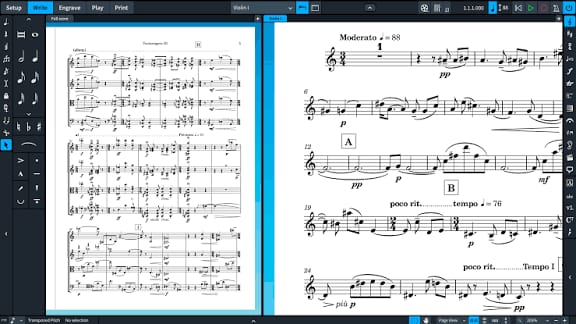
Pricing: $99 to $559 depending on whether you purchase Dorico Elements or Dorico Pro
Dorico represents the newest approach to notation software, designed from the ground up with modern workflow principles. Rather than replicating decades-old interface conventions, Dorico rethinks how composers interact with notation software.
The visual design feels cleaner and more contemporary than its competitors. Dorico minimizes clutter, presenting a focused workspace that many users find less mentally taxing during long composition sessions. The single-mode input method simplifies note entry compared to programs that require switching between multiple tools.
Despite being the youngest major notation program, Dorico has received aggressive development. It’s already reached version 5, with each update bringing substantial feature additions. The condensing feature, which intelligently combines staves to create conductor scores, represents the kind of innovation that distinguishes Dorico from older programs.
Best suited for: Composers who want modern interface design combined with powerful features, especially those frustrated by older programs’ workflows.
How to Choose the Right Free Music and Score Writing Software for Composers
The 90% Rule for Composers
Expert consensus suggests that approximately 90% of composers should start with free music notation software like MuseScore. This includes student composers, hobbyists, amateur arrangers, and many working professional composers. The program handles everything from lead sheets to full orchestral scores without costing anything.
Starting with the best free music writing software offers composers a valuable education in what they actually need from notation programs. After using MuseScore for several months, you’ll develop clear opinions about what matters to your composition workflow. If you eventually decide to upgrade to paid music composition software, you’ll make an informed choice based on your specific requirements rather than marketing claims.
When Composers Should Consider Paid Score Writing Software
Certain situations genuinely warrant composers investing in premium music notation software:
Professional composition obligations: If you’re collaborating with other composers or publishers who use specific software, matching their music writing tools can simplify the workflow.
Advanced notation needs for composers: Contemporary classical music often requires extended notation techniques that may be easier to implement in professional score writing software.
Composition workflow optimization: If you’re composing music daily for a living, the time saved by advanced features in professional music notation software can justify the cost.
Industry standards for composers: Film and television composition often operates within established technical pipelines that expect specific software formats.
The Try-Before-You-Buy Approach for Composers
Every major music notation software program offers some way for composers to test it before committing money. Finale, Sibelius, and Dorico all provide free trials or limited versions of their score writing software. Take advantage of these. Spend several hours in each program doing the kind of composition work you actually plan to do.
Pay attention to how each music writing software interface feels. Does the composition workflow make sense to you? Can you accomplish tasks without constantly consulting documentation? Some programs might be objectively powerful but still feel wrong for your personal composing style – and that subjective feeling matters enormously when you’ll spend hundreds of hours creating music in the software.
Getting Started with Free Music Writing Software for Composers
Based on detailed tutorials from experienced MuseScore composers, here’s how to begin your composition journey with the best free music and score writing software available in 2026.
Download and Initial Setup of Free Score Writing Software
Visit musescore.org and download the appropriate version of this free music notation software for your operating system. There’s no trial period to worry about – you’re downloading the full program. The installation process of this free music writing software is straightforward, similar to installing any other desktop application.
You can optionally create a free account on the MuseScore website, which gives composers access to thousands of community-uploaded scores. This can be helpful for learning how other composers approach music notation, though it’s not required for using the software itself.
Basic Music Composition Workflow in Free Notation Software
Note Entry Basics for Composers
The most fundamental skill in any music writing software is entering notes efficiently. MuseScore offers multiple approaches to suit different composer preferences. You can click notes into position using your mouse, which works fine for occasional music composition. For faster work, keyboard shortcuts dramatically speed up the score writing process.
The number keys correspond to note durations: 1 for whole notes, 2 for half notes, 3 for quarter notes, and so on. This might feel awkward initially, but becomes second nature quickly. To place a note, select the duration, then click where you want it on the staff.
For chords, hold the Shift key while entering additional notes. To adjust a note’s octave, select it and use Ctrl+Up Arrow or Ctrl+Down Arrow (Command on Mac). These simple shortcuts form the foundation of efficient note entry.
Tempo Manipulation for Practicing Compositions
One of MuseScore’s most practical features for composers learning new pieces is tempo adjustment. Every score has a tempo marking at the beginning – it might display as a specific metronome marking like “♩= 120” or a text indication like “Allegro.”
To change the tempo in this free music writing software, click on this marking and adjust the number to whatever speed you need for practicing your composition. Want to practice that fast passage at half speed? Simply change the tempo, hit the space bar to play, and the software plays at your specified speed while the blue tracking bar shows your position in the score.
This transforms MuseScore into a sophisticated practice tool for composers. You can work through difficult passages at comfortable speeds, gradually increasing the tempo as your technique improves.
Adding Musical Elements in Score Writing Software
The Palettes panel on the left side of this free music notation software contains everything composers need to add expression to their music. Need a crescendo? Find it in the dynamics palette, then either click to select and click on your score to place it, or drag it directly onto the appropriate location.
The same principle applies to articulations (staccato, accents, fermatas), tempo markings, key signatures, time signatures, and hundreds of other notation elements composers use regularly. Once an element is placed in your composition, the Properties panel on the right lets you adjust its specific characteristics – change the velocity of a dynamic marking, adjust the curve of a slur, or modify the playback behavior of a tempo change.
Best Free Music Notation Software for Composers
After analyzing expert reviews and comparing real-world usage by professional composers, the conclusion is clear: MuseScore is the best free music and score writing software for composers in 2026. It’s completely free, regularly updated, and powerful enough for everything from simple lead sheets to complex orchestral arrangements.
However, professional composers working on film scores, published editions, or highly complex contemporary music may find that Finale, Sibelius, or Dorico better serve their advanced composition workflow needs. The key is understanding whether you actually require these advanced features in your music writing software or whether you’re paying for capabilities you’ll rarely use as a composer.
The decision framework for choosing the best music notation software is straightforward: Start with MuseScore as your free score writing software. If you encounter specific limitations that genuinely hinder your composition work (not just features that sound nice in marketing materials), then evaluate paid music composition software options. By that point, you’ll know exactly what you need as a composer and can make an informed purchase decision.
Ready to Start Using the Best Free Music and Score Writing Software?
The best free music and score writing software for composers is the one you’ll actually use. MuseScore removes every financial barrier to getting started – composers can download it today and begin creating music immediately.
Whether you’re arranging a cover of your favorite song, composing original music, or transcribing melodies you hear in your head, having the right music notation software makes the creative process enjoyable rather than frustrating. And when free score writing software like MuseScore delivers professional results at no cost, there’s no reason for composers to delay starting their musical journey.
Join Inkwrit’s community of writers Whether you’re writing novels, articles, screenplays, or musical scores, share your creative journey and connect with fellow writers who understand the challenges of the craft. Sign up here to access our platform and discover more software recommendations for every type of writing.
This article about the best free music and score writing software for composers is based on expert reviews from The Musical Notes’ comprehensive software comparison, official MuseScore tutorials, and hands-on experience from professional music educators. All video sources are credited and linked for composers who want more detailed demonstrations of this music notation software

Author: Bridget Austin
Ifeoma, who writes under the pen name Bridget Austin, is the founder of Inkwrit — a freelance writing platform built for African writers and storytellers. With a background in copywriting and content strategy, she created Inkwrit to give African voices a professional home to publish, build portfolios, and grow their writing careers. When she's not building the Inkwrit community, she writes about freelance writing, African literature, and the business of creative work.